Tidy
In this article
- Book a settlement as one balanced entry per settlement, not one entry per order and not one entry for the deposit alone.
- Post the net to an Amazon clearing account, then let the bank deposit clear it to zero.
- Group lines by what they are: sales, shipping, promotions, refunds, fees, reimbursements and reserve movements.
- A settlement that spans a month end needs a written rule for splitting it.
What you are actually booking #
Amazon pays out in settlements. Each one has an ID, a date range, a deposit date and a total, and it lists every transaction that makes up that total: sales, shipping charged, promotions, refunds, selling fees, fulfillment and storage fees, reimbursements and balance movements. The bank sees only the total. QuickBooks needs the parts.
The goal is one entry per settlement that records each part in the right account and nets to the amount that was actually sent to your bank. If you also want order-level detail, that lives in your sales system or a report, not in the accounting entry. Our deposit versus sales guide explains why the two totals differ, and this guide picks up from there.
Accounts to create before you post #
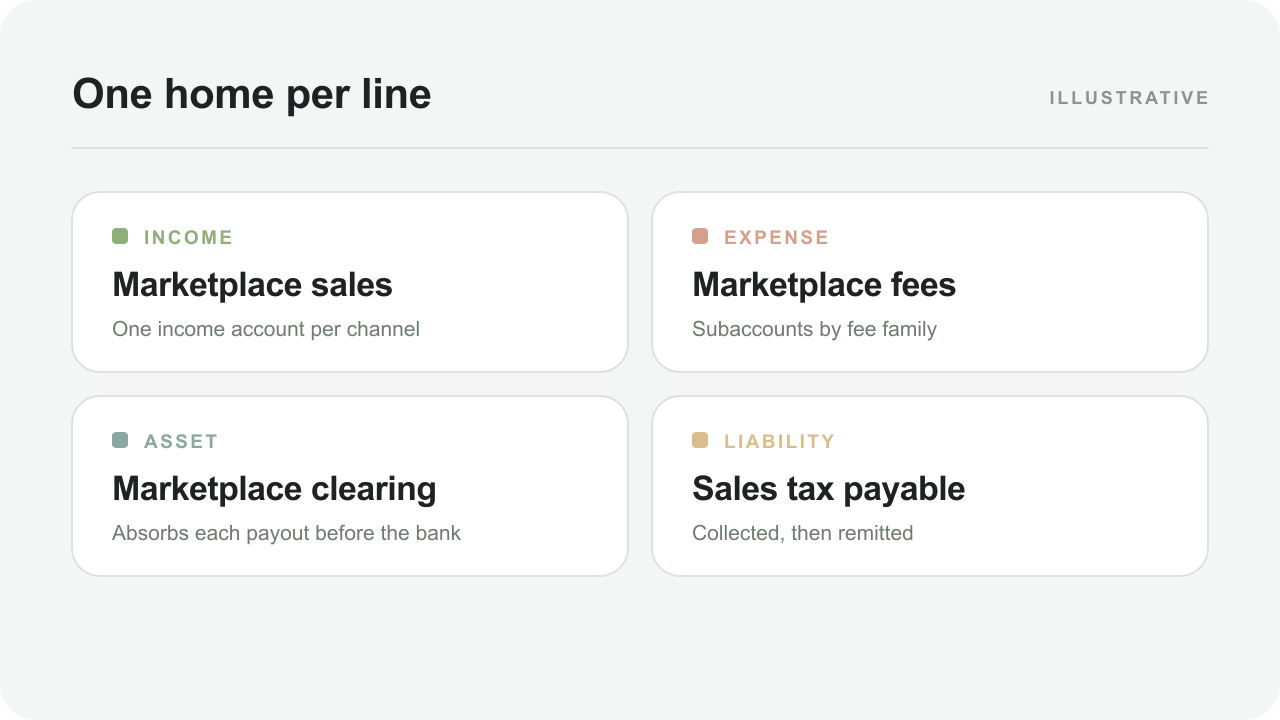
Set these up once, ideally with subaccounts you can reuse across channels:
- Amazon clearing, an other current asset account that holds the net of each settlement until the deposit arrives.
- Sales and Shipping income, so product revenue and shipping charged stay separate.
- Promotions and discounts and Refunds and returns, as contra-revenue or separate lines, so gross sales stay visible.
- Selling fees, Fulfillment fees and Storage and other services, one per bucket of cost.
- Reimbursements, treated as a recovery and not as sales.
- Marketplace reserve, a balance-sheet account for funds Amazon holds back.
The chart of accounts generator builds this set, and our QuickBooks chart of accounts guide explains each choice.
Step 1: choose the settlement and read its header #
Start from the settlement that matches the bank credit, not from a calendar month. Note its ID, start and end dates, deposit date, currency and total amount. In the flat-file version of the report, the header carries the total and each transaction row carries a type, an amount type, an amount description and an amount. Comparing the sum of the amounts with the declared total is your first check; if they differ, the file is incomplete or you are looking at the wrong settlement.
The free Amazon settlement analyzer reads a flat file in your browser and does this comparison for you, including a breakdown by bucket.
Step 2: group the lines #
Hundreds of rows collapse into a handful of groups. Labels differ by report version and account, so build the mapping from your own file and save it for next time.
| Kind of line | Typical examples | Account |
|---|---|---|
| Product sales | Principal on each order | Sales |
| Shipping charged | Shipping and handling on orders | Shipping income |
| Promotions | Discounts you funded | Promotions and discounts |
| Refunds | Principal and shipping returned to buyers | Refunds and returns |
| Selling fees | Referral or commission fees, and their reversals on refunds | Selling fees |
| Fulfillment fees | Per-unit fulfillment fees | Fulfillment fees |
| Storage and services | Storage, removal, subscription fees | Storage and other services |
| Reimbursements | Lost or damaged inventory credits | Reimbursements |
| Reserve movements | Funds held back or released | Marketplace reserve |
| Marketplace-collected tax | Lines where Amazon collects and remits tax | Excluded; not your income |
Keep tax on its own line. If Amazon collects and remits it, it should not reach your income; see our marketplace sales tax guide.
Step 3: post one balanced entry #
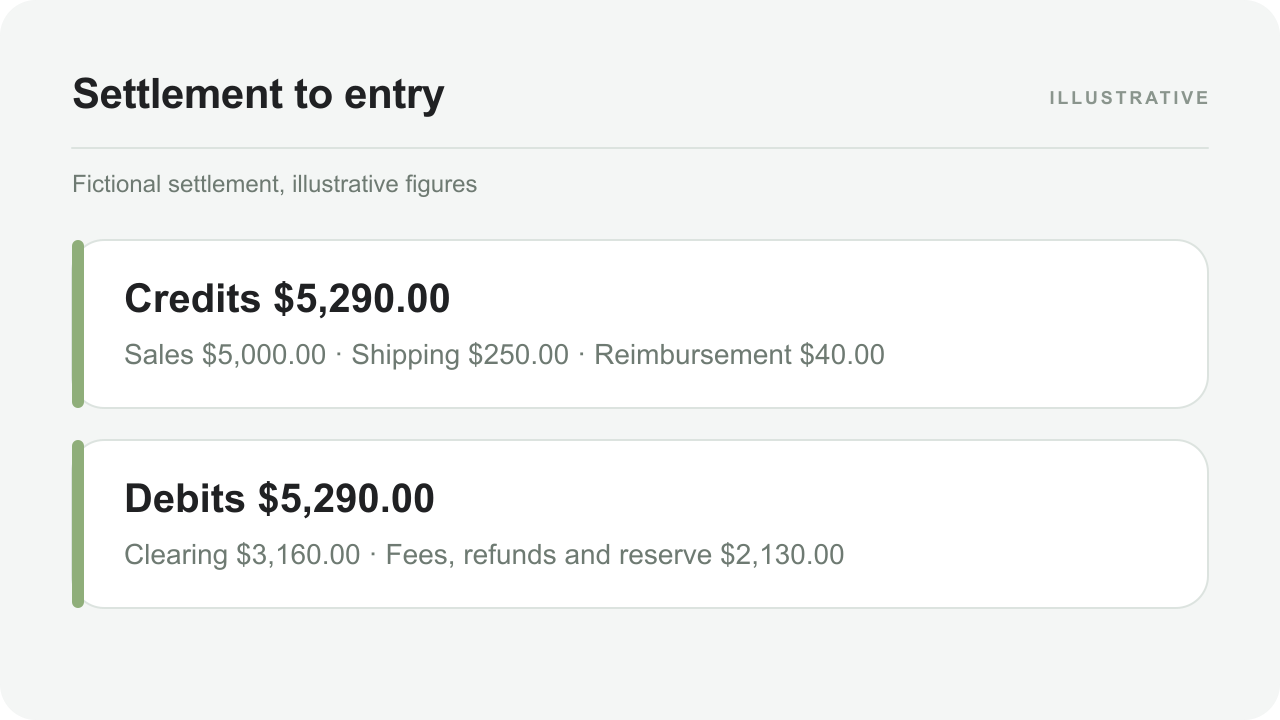
A fictional settlement, grouped
A settlement shows $5,000.00 of product sales, $250.00 of shipping charged, $200.00 of promotions, $300.00 of refunds, $750.00 of referral fees, $600.00 of fulfillment fees, $80.00 of storage fees, a $40.00 reimbursement and $200.00 moved into reserve. The net is $5,000.00 + $250.00 − $200.00 − $300.00 − $750.00 − $600.00 − $80.00 + $40.00 − $200.00 = $3,160.00, which is the deposit.
Illustrative figures. A real settlement also has taxes, timing items and adjustments.
| Account | Debit | Credit |
|---|---|---|
| Amazon clearing | $3,160.00 | |
| Promotions and discounts | $200.00 | |
| Refunds and returns | $300.00 | |
| Selling fees | $750.00 | |
| Fulfillment fees | $600.00 | |
| Storage and other services | $80.00 | |
| Marketplace reserve | $200.00 | |
| Sales | $5,000.00 | |
| Shipping income | $250.00 | |
| Reimbursements | $40.00 | |
| Total | $5,290.00 | $5,290.00 |
Debits and credits both total $5,290.00, so the entry balances, and the clearing account carries exactly the deposit. The payout journal entry tool builds an entry like this from your own figures and exports it as a CSV.
Step 4: match the bank deposit #
When the $3,160.00 appears in the bank feed, match it to the settlement instead of categorizing it. In QuickBooks that means recording a deposit from the clearing account, or matching the feed line to an existing transfer, so the clearing balance falls to zero. If you categorize the deposit as income, sales are counted twice, once in the settlement entry and again in the bank feed. Our duplicate sales guide shows what that looks like and how to find it.
If the credit matches no settlement, work through the unmatched deposits guide before booking anything.
Settlements that span a month end #
An Amazon settlement period often crosses a month boundary. On cash-basis books you can book the whole settlement when the deposit arrives and accept the timing. On accrual books you would split it by transaction date so each month carries its own sales, fees and refunds, with the unpaid portion left in clearing at month end. Choose one rule and use it every month. The payout period splitter shows both versions, and our cash versus accrual guide explains the trade-off.
A routine you can repeat for every settlement #
- Download the settlement file and note its ID, dates, deposit date, currency and declared total.
- Check that the lines add up to the declared total before doing anything else.
- Group the lines using your saved mapping and total each group.
- Post one balanced entry to the Amazon clearing account, with the settlement ID in the memo.
- Match the bank deposit to the clearing account when it arrives and confirm the balance returns to zero.
- Save the file, the entry and the bank line together, and note anything unusual.
After two or three settlements this becomes a ten-minute task. The first one is slower because you are building the mapping, which is the part worth doing carefully.
Several marketplaces and currencies #
If you sell in more than one Amazon marketplace, each can settle separately and in its own currency. Treat each settlement as its own entry, use the settlement’s currency, and keep a clearing account per currency so a balance is never a mix of two. Convert only where the report or your bank states the amounts; do not recompute an exchange rate of your own. Our multi-currency payouts guide covers the conversion lines and the bank’s side of the exchange.
What to keep for each settlement #
The entry is only as good as the evidence behind it. For every settlement keep the original file as downloaded, the entry you posted, the bank line it matched and a one-line note for anything that needed judgment, such as a reserve or a reimbursement. If a figure is questioned later, you can show where it came from in a minute, instead of reconstructing it from a report that may since have changed. A folder per month, with one subfolder per settlement, is enough.
Mistakes that cause rework #
- Booking the deposit as sales and then the settlement as sales again.
- Posting fees and refunds to one “Amazon expenses” account, which hides both margin and return rates.
- Treating a reserve as a fee, which turns a timing item into a loss.
- Recording a reimbursement as sales, which overstates revenue.
- Skipping the total check, so a partial file produces a plausible but wrong entry.
- Changing the mapping every month, which makes trends impossible to compare.
By hand or with software #
Done by hand, this takes a spreadsheet, a pivot and a careful entry for every settlement. That is manageable for one channel and a handful of settlements a month, and tedious beyond that. TidyPayouts is built to do the grouping and matching for you, then show the entry for review before anything is posted; it is free during beta, and QuickBooks Online is in limited beta. The Amazon to QuickBooks setup guide shows the workflow.
Promotions, coupons and refunds inside the groups #
Two line families appear in real settlements that the worked example above omits for simplicity, and both slot into the grouping cleanly. Promotions and coupons you funded — percentage-off, Lightning Deals, Prime-exclusive discounts — arrive as negative principal lines, and they belong in the Promotions and discounts account with the promotion’s name in the memo where volume justifies it. A deal that repriced a listing for a week produces a distinct promotion line per order; grouping them with ordinary sales would quietly restate your average selling price downward. Refund-related lines — the refund principal itself, plus the return of any tax you charged — post to Refunds and returns, with the referral-fee reversal that rides along posted where the original fee went.
The general rule that keeps both families honest: the books mirror the settlement’s own line types, one account per family, and the memo carries the promotion or refund identifier. When a campaign is being evaluated (“was the deal worth it?”), the answer is a filter on an account, not an archaeology project across sales. Sellers who lump promotion lines into sales discover the same fact at renewal time: the average price their P&L reports was never the price anything sold at.
Reserves and reimbursements inside the entry #
Reserve movements and reimbursements change the entry’s totals but not its structure. A reserve movement — funds held back at settlement time, or a release of previously held funds — posts to the Marketplace reserve account you created at setup: held amounts debit the reserve, releases credit it, and the account’s running balance is the money Amazon is holding. Because the reserve is a balance-sheet account, these lines never touch income; the settlement still nets to the deposit, and the clearing account still sweeps to zero when it arrives. The full mechanics — including the roll-forward your preparer will want — are in our reserve balance guide.
Reimbursements — credits for lost or damaged FBA inventory, returned-item reimbursements, and corrective credits — post to the Reimbursements account as their own group, never into sales. The line type matters at tax time: reimbursements of previously expensed or written-off units are recoveries, and the wrong account turns a wash into phantom income. If reimbursement volume is significant, our FBA reimbursements guide covers the monthly routine and the two errors that are worth watching for.
Common questions #
Should I record every order instead of one entry per settlement?+
Only if you need order-level detail in the books. Most sellers keep orders in their sales system and post one entry per settlement, which is faster and ties directly to the deposit.
Where do FBA fees go compared with referral fees?+
Both are selling costs, but keep them in separate accounts. Referral fees move with price, fulfillment fees move with size and weight, and mixing them hides which one is changing.
What if the settlement total does not match my bank deposit?+
Check the currency, whether two settlements were paid together, and any reserve or prior-balance line. Our unmatched deposits guide gives the order in which to look.
Can I post the settlement without a clearing account?+
You can, but the deposit and the entry will then fight each other in the bank feed. A clearing account makes the match mechanical and gives you a balance that signals errors.
Sources and review date #
Written November 13, 2026 from general bookkeeping practice. Provider behaviour varies by account and changes over time, so confirm the details against your own statements and the help pages below. Examples are fictional; confirm account mappings and tax treatment with your bookkeeper.