Tidy
Tidy
In this article
- A marketplace deposit is a net figure, so it needs accounts for its parts: channel income, fee families, refunds, tax and a clearing account.
- Fee subaccounts — selling, fulfillment, advertising, processing — keep margin reports honest without cluttering the chart.
- The clearing account absorbs each payout so the bank deposit always matches to the penny and never touches sales directly.
- Sales tax collected by marketplaces is a liability passing through, not income; give it its own account from day one.
Why a generic chart lets payouts down #
A fresh QuickBooks Online company arrives with a sensible default chart of accounts: a checking account, sales, advertising, office expenses, a few others. It collapses the moment marketplace money arrives, because marketplace money does not arrive the way the chart expects. Amazon, Walmart, eBay, Etsy and Shopify do not send you an invoice for a sale. They send one net deposit that bundles sales, shipping, refunds, several species of fees and sometimes tax — and the deposit rarely equals anything visible in your sales dashboard.
Point a generic chart at that deposit and one of two things happens. Either the whole deposit lands in “Sales”, in which case revenue is understated by the fees and nobody can say by how much without reopening the settlement. Or an untidy mix lands in “Uncategorized income”, and your books diverge from your marketplaces until nobody trusts either. Both versions reconcile to the bank; neither answers a single useful question.
The fix is not exotic. It is a handful of accounts chosen so that every line a marketplace pays you — or takes from you — has exactly one obvious home. Set them up once, connect the channels with a reviewable mapping, and posting becomes mechanical.
The core accounts to add #
Different bookkeepers will split these differently, and that is fine; the account set below is the vocabulary, not a prescription. Agree the final list with your bookkeeper before connecting anything.
| Account | Type | What lands in it |
|---|---|---|
| Marketplace sales — per channel | Income | Product revenue, split by channel |
| Shipping income | Income | What buyers paid you to ship |
| Marketplace selling fees | Expense | Referral, commission, transaction, listing fees |
| Fulfillment and storage fees | Expense | Pick-pack-ship and warehousing costs |
| Marketplace advertising | Expense | On-platform ad spend, however it is billed |
| Payment processing fees | Expense | Costs of taking the buyer’s money |
| Marketplace refunds | Expense or contra-income | Money returned to buyers |
| Marketplace clearing | Current asset | Payouts in transit; emptied by the bank deposit |
| Sales tax payable | Current liability | Tax collected, by marketplace or jurisdiction |
If you carry physical inventory you also need inventory and cost-of-goods accounts — a larger topic with its own conventions; this guide focuses on the payout side. The final structure is a bookkeeping decision.
Notice what the set does not include: a miscellaneous marketplace account. Every account above has a definition precise enough that a person — or software — can decide for any given settlement line whether it belongs. The moment a chart contains an account whose definition is “other”, reconciliation questions start dying there.
Subaccounts keep fee reports readable #
QuickBooks lets accounts nest, and marketplaces are the natural use case. A single parent “Marketplace fees” with children — selling fees, fulfillment, storage, advertising, processing, other programs — gives you a one-line total when you want it and a one-click expansion when you need it. Reports stay readable at the top and honest underneath.
The same trick keeps channels apart. “Marketplace sales” as a parent with Amazon, eBay, Etsy, Walmart and Shopify children answers “which channel actually earns?” without the clutter of five unrelated top-level accounts. If you later adopt classes or locations for a second dimension — channel by product line, say — the accounts you set today keep working; that choice is not lost by starting with subaccounts.
How fine to slice is a judgment about the questions you intend to ask. Selling fees and advertising behave so differently — one scales with orders, the other with decisions — that merging them destroys the ability to manage either. Payment processing is small but worth separating because it is the fee most often double-counted by accident. Storage fees deserve their own line the month they start appearing on your profit and loss without explanation, which is precisely when it is too late to have created the account.
The clearing account, explained #
The clearing account — “Marketplace clearing”, “Payouts in transit”, “Undeposited marketplace funds”, the name varies — is the piece most charts miss, and the one that makes bank feeds pleasant. It is an asset account with one job: receive each payout summary as it is posted, and be emptied when the matching bank deposit clears.
The flow has two steps. Posting a payout debits the clearing account with the deposit amount and, at the same time, moves the parts — income here, fees there, refunds to their line. Then the bank feed sees the actual deposit, and you match it to the clearing entry instead of to sales. The account returns to zero; the deposit has matched something exact; nothing ever posts straight from the bank feed to an income account again.
Why not skip it and book deposits straight to sales? Because deposits are net. A direct booking forces you to split the deposit at the moment it clears — hunting through settlements at the bank feed — or to accept a net figure as revenue. With a clearing account, the split happens once, from the settlement, in calm conditions; the bank feed becomes a five-second confirmation instead of a monthly puzzle. An in-transit balance at month end is the honest picture anyway: money the marketplace owes you that simply has not landed yet.
What a healthy clearing account looks like
Posted payout on the 14th: clearing account holds $8,425.20. Bank deposit on the 17th: matched, clearing returns to zero. Between those dates the $8,425.20 is not missing and not sales — it is a receivable, sitting in an account whose balance means exactly that. If the clearing account never returns to zero, something has not matched; the leftover amount is the value of the unexplained piece.
TidyPayouts routes every payout through your chart of accounts with the mapping shown before posting — so the bank feed matches and the clearing account returns to zero.
A worked example: one payout, three entries #
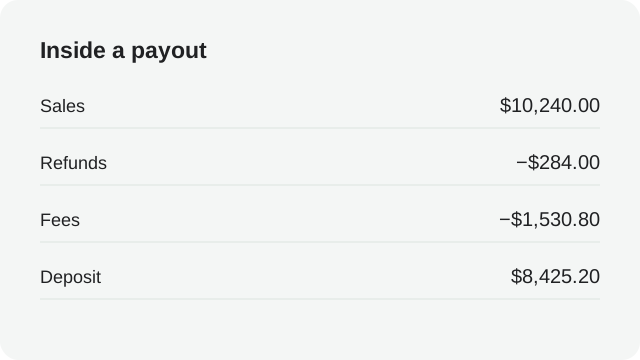
Here is the same fictional payout from our guide to why your Amazon deposit doesn’t match your sales, now expressed as bookkeeping. Sales are $10,240.00, refunds $320.00, fees $1,494.80, deposit $8,425.20.
Entry 1 — post the payout from the settlement:
| Account | Debit | Credit |
|---|---|---|
| Marketplace clearing | $8,425.20 | |
| Marketplace selling fees | $680.00 | |
| Fulfillment and storage fees | $742.40 | |
| Marketplace advertising | $72.40 | |
| Marketplace refunds | $320.00 | |
| Marketplace sales — channel | $10,240.00 |
Entry 2 — match the bank deposit: debit Checking $8,425.20, credit Marketplace clearing $8,425.20. The clearing account is back to zero and the bank feed line is accounted for.
Entry 3 — an ad charge on the card: debit Marketplace advertising $118.75, credit Checking $118.75. Not every marketplace cost arrives inside a payout; some accounts bill advertising or services to a card, and this entry keeps the expense line complete rather than letting the settlement’s copy of it double up.
Illustrative figures. The debits of entry 1 sum to exactly $10,240.00, matching the credit — that balance check is the first thing to verify whenever a payout entry looks wrong.
Three entries, and now the questions answer themselves: sales by channel are gross; fees are separated by behavior; advertising is complete across both billing paths; the bank feed has matched; and profit is untouched by money that merely passed through. This is the entire promise of a marketplace-ready chart of accounts, expressed in three rows of arithmetic.
Where refunds and reimbursements go #
Refunds are where charts quietly rot, because there are two defensible conventions and both get used. Treating refunds as their own expense line keeps gross sales visible — useful when you think in terms of demand. Treating them as contra-income keeps net revenue in the sales line — useful when you think in terms of margin. Bookkeepers argue about which is better; both are correct, but only if one is chosen and used everywhere. A chart with both a refund expense and refund reductions buried in sales is the worst of the three options, because nobody can say which figure is real.
Reimbursements — marketplace credits for lost inventory, resolved claims, goodwill payments — deserve their own decision rather than a default to “other income”. A reimbursement that repays a cost you already expensed is a recovery; booking it as income double-counts. Where it lands depends on the original treatment of the cost, which is exactly the kind of one-time decision to make with your bookkeeper and write down.
Whichever conventions you adopt, record them next to the chart itself — a note in the account description is enough. Six months later, the person doing the reconciliation should not have to re-derive why a refund landed where it did.
Sales tax you collected but never touched #
Marketplace facilitator rules mean that on many marketplaces, in many jurisdictions, the marketplace collects and remits sales tax on your behalf. The tax appears in the payout as paired lines — collected, then remitted — that net to zero, as our Etsy reconciliation guide shows in a worked example. In your books the tax still needs a home: a sales tax payable liability that receives the collected amounts and is reduced as the marketplace remits them.
Why bother for money you never touch? Because the liability account is the audit trail. It shows, line by line, what was collected on your behalf and when it was remitted, which is precisely the record a filing review asks for. It also protects the profit and loss from tax-shaped noise: income stays net of tax, and nothing in expenses is secretly a remittance. Where you remit some taxes yourself — a state where the marketplace does not facilitate, or a channel outside facilitation rules — the same account carries that obligation until you file; only the second half of the movement changes.
Which jurisdictions are yours to file, and how marketplace-collected amounts interact with your registrations, is tax advice territory — confirm with your bookkeeper or tax adviser. The chart’s job is simpler: keep the tax visible and keep it out of income. QuickBooks’s own guidance on the chart of accounts describes accounts as the categories behind every transaction; a liability named for tax is a category that will thank you at filing time.
Naming and numbering that scales #
Names do real work in a marketplace chart. “Amazon — selling fees” beats “Fees 2” for the same reason a warehouse labels aisles: the next person has to find things without you. Put the channel first, then the fee family, and keep the pattern identical across channels so reports group naturally. Avoid names whose meaning depends on remembering a conversation.
If you use account numbers, reserve ranges by type — income in one band, expenses in another, the clearing account and tax payable near their balance-sheet neighbours — and leave gaps for the channels you have not launched yet. You will add a channel; everyone does. The cheap moment to plan for it is the day you name the first five.
Two habits age well. First, when an account turns out to be wrong — too broad, duplicated, silently empty — retire it rather than reusing it for a new meaning; history stays interpretable. Second, resist the urge to create an account per settlement row label; marketplace line labels evolve, and the chart should hold families, not whoever’s naming mood that quarter. QuickBooks’s help on adding accounts walks through the mechanics; the judgment above is the part the mechanics cannot supply.
Connect channels with a mapping you can review #
Once the chart exists, connecting a channel is a mapping exercise: each type of settlement line — sales, each fee family, refunds, tax — points at one account. Integration setup guides, including our Amazon, Shopify, eBay, Etsy and Walmart walkthroughs, cover the connection steps channel by channel. The chart determines whether that mapping is a five-minute review or an argument.
Whatever tool does the posting, insist on two properties. The mapping should be visible before anything posts, so a line aimed at the wrong account can be caught while it is still a setting rather than an entry. And the first postings should be reviewed against the settlement they came from — the payout, the groups, the deposit — before the routine is trusted. TidyPayouts is built around exactly that review: payouts are shown as they will post, mapped to your chart, before anything reaches QuickBooks.
A settled mapping also survives staff changes and marketplace quirks. When a marketplace introduces a new fee type, the mapping shows a gap rather than silently dumping the line somewhere plausible; you add one account, review, and continue. Charts drift the same way closets do — the fix is a visible system, not occasional heroics.
A tidy monthly review #
The chart earns its keep in a monthly review that takes minutes when everything is fine and points precisely at the month when something is not.
- Clearing account: at or near zero, with any balance explainable as a payout in transit you can name.
- Sales by channel: gross figures that tie to the settlements posted, not to dashboards.
- Fee subaccounts: each trending in line with the channel’s order volume; jumps get a settlement opened next to them.
- Advertising: complete across settlement-deducted and card-billed charges, with no duplicates.
- Sales tax payable: movements match the marketplaces’ collected-and-remitted lines, and your own filings where you remit.
- Refunds: consistent with the convention you chose, and traceable to orders.
Six checks, each with a defined answer. When one fails, the account structure itself usually says where to look — that is what it is for. Our payout forecaster and fee comparison tool cover the forward-looking side: what these balances and fee rates imply for next quarter’s cash and channel mix.
Common questions #
Do I need a separate QuickBooks company for each channel?+
Usually not. Channel subaccounts — or classes, if your bookkeeper prefers — keep channels separate inside one company, which is where consolidated profit is actually computed. A separate company is a bigger structural decision for separate businesses, not for adding a sales channel.
Can I just use one “Marketplace fees” account?+
To start, yes — one fee account is workable and simpler than none. Create subaccounts when you want to compare fee families or see advertising separately; mappings move easily, and starting coarse is better than inventing precision you will not maintain.
Where do marketplace reimbursements go?+
Generally against the cost that generated them rather than into income — a lost-inventory reimbursement recovers an expense. The exact treatment depends on how the original cost was booked; decide once with your bookkeeper and note it on the account.
Sources and review date #
Reviewed October 26, 2026 against QuickBooks’s own guidance below. Account structures vary by business; agree the final chart with your bookkeeper or accountant. Examples are fictional.