Tidy
Tidy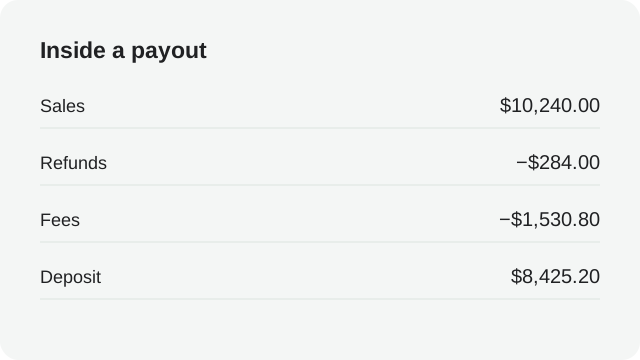
In this article
- An Etsy deposit is what remains after fees, refunds and tax movements — it is not your gross sales for the month.
- Group Etsy deductions into families: listing, transaction, payment processing, Offsite Ads and currency conversion.
- Sales tax Etsy collects on your behalf passes through the payment account and out again; it is not income.
- Reconcile one monthly statement at a time, and carry the payment account balance forward like a bank statement.
The deposit is a net payment, not your sales #
Etsy does not pay you order by order. Sales, shipping, refunds and fees collect in your payment account, and on the schedule shown in your own account Etsy sends the balance as a deposit to your bank. By the time the money arrives, listing fees, transaction fees, payment processing fees, advertising fees and tax movements have already been netted out. The number in your bank is therefore smaller than the orders dashboard — not because money went missing, but because the deposit is the last step of a longer calculation.
That is also why reconciling Etsy from the bank feed alone never works. The bank sees one number. The payment account sees every number behind it. A payout reconciliation always runs in one direction: from the orders and the payment account towards the bank, never the other way round.
The reports to open #
Shop Manager’s finances section shows the payment account: activity by period, the running balance, and the deposits taken from it. The monthly statement summarises the same activity in a form your bookkeeper can file. Order-level detail — what each sale, refund and fee was — sits with the orders and their transaction records.
For a reconciliation you need three views of the same month: the orders you made, the payment account activity that priced them, and the deposit that left the account. Etsy’s own help centre describes the payment account as the place to track these amounts, and the monthly statement as the record of what was charged and paid.
Which record answers which question
“How much did I sell?” — the orders view. “Why is the deposit not that amount?” — the payment account activity and its fee rows. “Did the bank receive what Etsy said it sent?” — the deposit record and your bank statement. Three questions, three records; a reconciliation that answers one with the wrong record always ends in a guess.
Know the fee families #
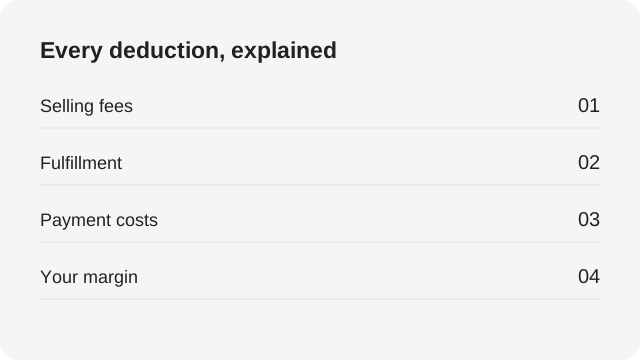
Etsy’s fees are easier to reconcile when you stop reading them as a wall of small deductions and start sorting them into families. Each family behaves differently, lands in a different account in your books, and is confirmed in a different place.
| Fee family | When it is charged | Where to confirm it |
|---|---|---|
| Listing fees | When a listing is published or auto-renews | Payment account activity, fee rows per listing |
| Transaction fees | When an item sells, on the order amount | Fee row on each sale; policy pages for the rate |
| Payment processing | When Etsy Payments processes a sale | Fee row per order; rate depends on your country |
| Offsite Ads | Only when an ad-attributed order is placed | Fee row on the attributed order |
| Currency conversion | When listing and deposit currencies differ | Conversion row on the affected orders |
| Adjustments | Refunds, reversals, corrections | Own rows in the payment account |
Rates and program details change over time and vary by shop; the rate to book is the one on your own fee rows, not the one you remember. Etsy’s fee policy and seller help are the reference for how each family is meant to work.
Two families deserve special attention. Offsite Ads fees only exist on orders that Etsy’s advertising attributed to you, so a month with one such order shows one conspicuous fee row that has nothing to do with your other sales. And currency conversion appears whenever your listing currency differs from your deposit currency, which makes every row slightly different from the number on the order itself — a reconciliation headache you remove entirely by reconciling in the deposit currency.
A worked example: one deposit, fully explained #
Here is a fictional month, built so that every line sums exactly to the deposit. The shop sells in US dollars, has sixty-four orders, and one of them came from an Offsite Ads click.
| Payment account line | Amount |
|---|---|
| Product sales including shipping | $4,180.00 |
| Refunds issued in the month | −$160.00 |
| Listing fees (32 renewals at $0.20) | −$6.40 |
| Transaction fees | −$261.30 |
| Payment processing fees | −$136.60 |
| Offsite Ads fee (one attributed order) | −$27.00 |
| Sales tax collected (then remitted for you) | +$246.00 / −$246.00 |
| Deposit to bank | $3,588.70 |
Illustrative figures. The two sales tax rows net to zero: the money passed through the payment account and straight back out to the tax authority on the seller’s behalf.
The point of the exercise is not the arithmetic — it is that the deposit of $3,588.70 is now boring. Someone looking at the bank feed three months from now can trace it to this table in minutes. That is the standard your reconciliation should meet every month, and it is the standard TidyPayouts builds towards: every payout split into named lines before it reaches the books.
Sales tax you collected but never touched #
In many US states and in many countries, marketplace facilitator rules make Etsy responsible for collecting and remitting sales tax, VAT or GST on your sales. The tax still appears in your payment account: it is added on the order, shown as collected, and then shown as remitted by Etsy on your behalf. It passes through your payout like a passenger, not a driver.
The bookkeeping consequence is easy to state and easy to get wrong: the tax is not your income, and the remittance is not your expense. If you record the order total including tax as sales, you overstate revenue by exactly the tax amount and then have to unwind it at filing time. Recording the tax into a liability account and out again when the marketplace remits it keeps the filing trail visible without ever touching your profit. Where a marketplace does not facilitate the tax, the same structure applies with you doing the remitting — the liability just waits longer. Confirm which jurisdictions are yours to file with your bookkeeper or tax adviser; the reconciliation job is the same either way.
Give every line a home #
Reconciliation ends in your books, so the last mile is a mapping decision: which account receives each payment-account line? Decide it once, in writing, and every month afterwards is mechanical.
| Payment account line | What it is | A typical bookkeeping home |
|---|---|---|
| Sales including shipping | Revenue from your orders | Etsy sales income |
| Refunds | Money returned to buyers | Refunds or contra-income |
| Listing + transaction + processing fees | Costs of selling | Etsy fee subaccounts |
| Offsite Ads fees | Advertising cost | Marketplace advertising |
| Sales tax collected / remitted | Money you handled, not earned | Sales tax payable liability |
| Deposit | The net movement | Clearing account, matched to bank |
If the accounts in that right-hand column do not exist in your books yet, our guide to a QuickBooks chart of accounts for marketplace sellers walks through setting them up. The one-line version: income per channel, fees as subaccounts, tax as a liability, and a clearing account that absorbs each payout so the bank deposit always has something exact to match.
TidyPayouts splits marketplace payouts into named lines — sales, refunds, each fee family — so your books stay reviewable and the bank feed matches to the penny.
Follow the payment account across months #
The payment account is a ledger with a memory. Activity this month may sit in the account for days before the deposit takes it, and a refund for a November order can appear in December’s activity. So the reconciliation unit is the statement period, not the calendar month of the orders: opening balance plus activity minus deposits equals closing balance, and each month’s opening balance must equal the previous month’s closing balance.
| Statement | Opening | Net activity | Deposited | Closing |
|---|---|---|---|---|
| Statement 1 | $0.00 | $3,588.70 | $3,588.70 | $0.00 |
| Statement 2 | $0.00 | $4,112.45 | $3,900.00 | $212.45 |
| Statement 3 | $212.45 | $3,870.15 | $4,082.60 | $0.00 |
Illustrative figures. In statement 2 the deposit was smaller than the activity, so the remainder carried into statement 3 — which is why its deposit is larger than that month’s activity alone.
Reading the account this way converts “my deposit looks wrong” into a solvable puzzle. If opening and closing balances chain correctly and every deposit matches the bank, the account is fully explained, whatever the individual rows look like. If the chain breaks, the break itself tells you which statement to inspect.
A repeatable monthly reconciliation #
- Choose one statement period and note its opening balance.
- Sum the activity rows by family: sales, refunds, each fee family, tax movements.
- Compute the expected deposit: opening balance plus activity minus deposits, and check the closing balance is zero or carries forward.
- Match each deposit to a bank credit for the same amount and currency.
- Post the summary into your books using your agreed mapping, with the statement as the attachment.
- Carry the closing balance forward and repeat next month.
Six steps, one period, no estimations. A reconciliation you can describe is a reconciliation you can delegate — and audit three years later.
When the numbers disagree #
- A refund appears in a later period than the sale. Normal. Reconcile the period the movement happened in, and keep the order reference so the pair is traceable.
- Amounts differ from the order records. Often currency conversion on a cross-currency listing, or a fee rate you had not noticed changing. Read the row-level fee lines rather than the order total.
- A deposit does not appear in the bank. Check the deposit date and weekend clearing first, then the bank details on file. Etsy’s help recommends checking the payment account’s deposit history before contacting support.
- The balance does not roll forward. Look for a row that is not a sale, fee or refund — a correction, a hold, or a deposit recorded twice. The missing movement is the difference between the two statements’ closing and opening balances.
- Funds seem delayed. Newer shops and certain risk reviews can see holds on funds; the payment account shows what is available versus what is reserved.
One habit prevents most of these surprises: download the statement before you need it. Every row you can see today is a question you will not have to ask support about next quarter.
Common questions #
Why is my Etsy deposit lower than my order total?+
The deposit nets out fees, refunds and tax movements before the money reaches the bank. Order totals are gross; the deposit is what remains. The payment account activity shows each deduction that sits in the gap.
Does Etsy deposit the sales tax to me?+
Where marketplace facilitator rules apply, the tax is collected, shown in your payment account and remitted by Etsy on your behalf, so it passes through the payout without changing your profit. Where facilitation does not apply, filing obligations depend on your own registration; confirm with your bookkeeper or tax adviser.
Why does my payout show a currency conversion?+
When your listing currency differs from your deposit currency, amounts are converted and a conversion fee row appears. Reconciling in the deposit currency keeps every line comparable to the bank credit.
Sources and review date #
Reviewed October 26, 2026 against the provider guidance below. Rates, schedules and program details change; the numbers in your own payment account are the ones to book. Examples are fictional; confirm account mappings and tax treatment with your bookkeeper.