Tidy
Tidy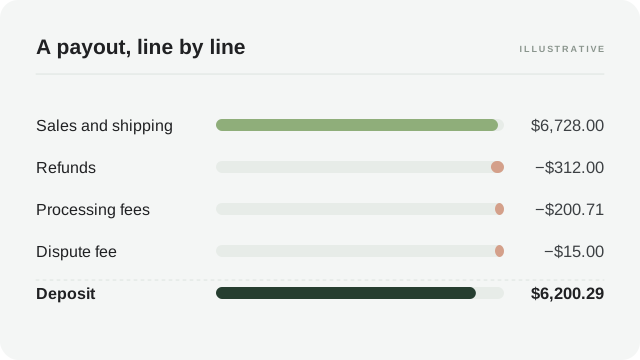
In this article
- A Shopify payout lands on its own schedule and nets sales, refunds, gateway fees and disputes into one deposit.
- Gateway fees scale with the order amount; most other Shopify costs — subscriptions, apps — are billed separately on an invoice, not taken from the payout.
- Sales tax you collect can pass through the payout; it is not income, and the remittance is not an expense.
- Reconcile one payout at a time against its own report, and match the deposit through a clearing account.
The payout has its own schedule #
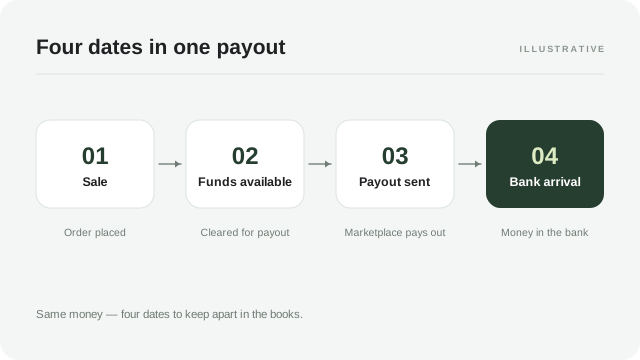
Shopify does not pay you when the customer pays. Orders arrive throughout the week; the money for them collects with your payment provider and arrives as a payout on the schedule shown in your admin — daily, weekly, or somewhere in between, depending on your settings and where your account stands. Shopify’s own help describes how payout timing works and how to change the schedule; both are worth ten minutes, because the schedule determines which orders land in which payout.
That gap between the order and the payout is the first thing to internalise. A payout is not a day’s sales. It is a slice of history: orders from several days, minus refunds that may reference older orders, minus fees charged on their own rhythm. When the deposit does not match yesterday’s dashboard, it was never supposed to.
Which record answers which question
“How much did I sell?” — the orders view. “What will I be paid and when?” — the payouts view, where upcoming and past payouts are listed. “Why is this payout that number?” — the payout report behind it, order by order. Three questions, three records; asking one record to answer another is where Shopify reconciliation goes wrong.
The lines to expect #
Payout reports vary a little by region and setup, but the families of lines are stable. Learn the families once and every payout reads the same way.
| Line family | What it is | Typical bookkeeping home |
|---|---|---|
| Sales | Order totals for the payout’s orders | Shopify sales income |
| Shipping charged | What customers paid you to ship | Shipping income |
| Refunds | Money returned to customers | Refunds or contra-income |
| Gateway fees | Processing cost per order, charged by your payment provider | Payment processing fees |
| Chargebacks | Disputed amounts and dispute fees | Dispute lines, kept separate |
| Sales tax collected | Tax gathered on your behalf | Sales tax payable liability |
| Gift card redemptions | Orders paid with gift card balances | Release of a liability |
Shopify’s subscription, apps and shipping labels are usually billed to a separate invoice or card rather than deducted from payouts — check your own billing setup rather than assuming either way.
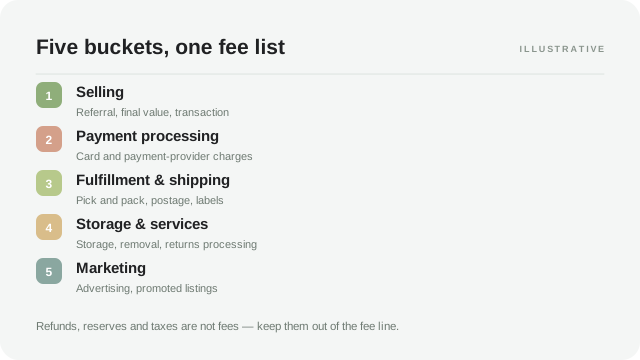
The table’s quiet point: almost everything on a payout is either income, a refund, or a cost of taking the money. Storage, subscriptions and most app charges do not belong on payout lines at all. If your payout reconciliation keeps producing mystery rows, the likeliest culprit is a charge that was never a payout line in the first place.
Gateway fees scale with orders #
Processing fees are the payout’s most predictable deduction: a percentage of the order amount plus a small fixed amount per transaction, at rates that depend on your plan, region and provider. Shopify’s help documents how fees are assessed and where they appear; the rates to book are the ones on your own payout report.
Two consequences matter for bookkeeping. First, fees move with revenue, so a fee line that spikes out of proportion to sales is a signal worth reading — a plan change, a new region, or orders routed through a pricier method. Second, refunds usually change the fee picture: a refunded order may keep part of its original processing fee. That residue is easy to miss and, at scale, adds up to a real line of its own.
A worked payout
A fictional week: sales of $6,240.00 across 96 orders, shipping charged $488.00, one chargeback fee of $15.00, refunds of $312.00, and gateway fees of 2.9% plus $0.30 per order on the net amount. Processing comes to $200.71. Sales tax of $318.40 passes through the payout and straight back out. The deposit is $6,200.29. Every line is visible in the payout report; nothing had to be estimated.
TidyPayouts shows a payout split into named lines before it posts, mapped to your chart of accounts, so the deposit always matches to the penny.
Tax passes through the payout #
Where Shopify calculates and collects sales tax, VAT or GST for you, the tax appears in the payout as collected and then leaves it as remitted or payable on your behalf, depending on your setup. The two rows cancel; the deposit is unaffected; your profit should be too. The mistake to avoid is treating the collected leg as revenue and the remitted leg as an expense — that inflates both sides of the profit and loss by exactly the tax amount and unwinds nothing.
Give the tax its own liability account, let the collected leg raise it and the remitted leg reduce it, and filing season becomes a report rather than a reconstruction. Which taxes are yours to file, and where marketplace facilitation applies, is a question for your bookkeeper or tax adviser — the payout’s job is only to keep the trail visible.
Disputes arrive with their own timing #
A chargeback deducts the disputed amount when the dispute opens, not when it resolves, and adds a dispute fee on top. If you win, the money returns in a later payout; if you lose, the deduction stands. That timing makes a payout look wrong against its own orders — the gap is a dispute from an earlier week. Keep disputed amounts and dispute fees on their own lines until resolved; our guide to chargebacks and payment disputes follows one through the books.
Refunds and later periods #
Refunds process quickly on Shopify, but the payout they reduce and the payout that carried the sale are not always the same one — especially around a schedule boundary or a refund issued days after delivery. The reconciliation rule is the same as on every channel: match each payout to its own report, and let the report carry the cross-references. Never net a refund against a different week’s sales to make a number look tidy.
A repeatable monthly routine #
- List the payouts that settled in the month, with amounts and currencies.
- For each, open its payout report and group the lines: sales, shipping, refunds, processing, disputes, tax.
- Check the groups sum to the deposit, to the penny.
- Match each deposit to a bank credit; note any payout still in transit at month end.
- Post the grouped summary through your mapping — clearing account for the deposit, named lines for the parts.
- Confirm the gift card liability and sales tax liability moved the way the reports say.
Six steps, one payout report at a time. The first month takes an hour; by the third it is a checklist you can delegate, which is the point — a reconciliation that lives only in your head cannot be handed over or audited.
Recording a payout in your books #
The posting follows the grouping. Sales and shipping income land gross; refunds go to their agreed line; processing fees to theirs; tax to the liability; the deposit to the clearing account that the bank credit then empties. If those accounts do not exist yet, our chart of accounts for marketplace sellers sets them up, and the Shopify to QuickBooks guide covers the connection and the mapping review.
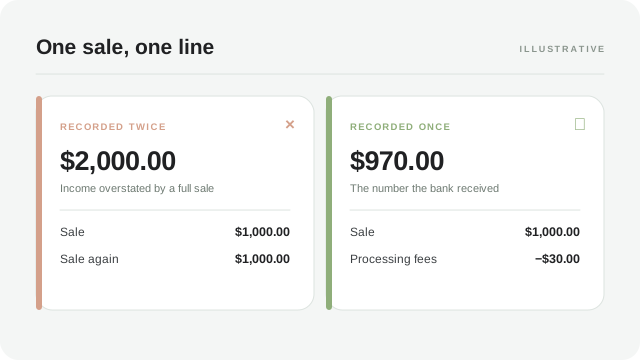
The duplicate-sales trap deserves its own warning, because it is the most common Shopify posting error: the deposit, the orders, and an e-commerce integration can each record the same revenue. Choose one source of truth — our guide to recording Shopify sales without duplicates walks the checklist — and let the payout reconciliation confirm it rather than add to it.
When payouts pause #
Most of the time the schedule in your admin is the schedule reality keeps. Occasionally it is not: new accounts, abrupt changes in sales pattern, or a risk review can hold funds or slow disbursements while the provider satisfies itself. The payouts view shows what is pending and why, in whatever detail your account provides, and the honest bookkeeping response is to record the reality — funds in transit, or held — rather than the schedule’s promise. A held payout is not missing money; it is money with a delay attached, and it belongs in a lane your month-end report can point at.
Two habits make pauses survivable. First, keep settlement records for the affected period exactly as you would anyway, so that whenever the money moves, the posting is ready. Second, watch your own cash runway against the delay: the payout forecaster is built for this question, and a week of buffer decided in calm is worth more than any explanation requested in panic. If a hold arrives with no stated reason, ask the provider — politely, early, and in writing — and keep the answer with your records.
Reading Shopify beside your other channels #
Sellers on more than one channel eventually notice the same order behaving differently in each payout flow: marketplaces net everything into a batch; Shopify keeps the payout close to the card transaction and leaves subscriptions and apps on separate bills. Neither is wrong, but comparisons between channels need the lines, not the deposits. A $10,000 marketplace settlement and a $10,000 Shopify payout can represent meaningfully different amounts of selling, and only the grouped lines — sales, refunds, processing, tax — put them on one honest footing.
That is the quiet argument of this whole series: deposits are settlement artifacts, and revenue is a property of orders. The channel that lands closest to the order date will always look better on a bank statement than the channel that batches — until fee lines are set beside it. Group your Shopify payouts the way you group marketplace settlements, and multi-channel margin reports stop rewarding the slowest payer.
Common questions #
Why is my Shopify payout lower than my sales?+
The payout nets refunds, gateway fees and disputes against sales before the deposit, and covers its own period rather than a calendar day. The payout report lists every deduction that sits in the gap; reconcile to it, not to the orders dashboard.
Are Shopify subscription and app charges taken from my payout?+
Usually not — most platform billing runs on a separate invoice or card, while payout deductions are the costs of taking orders. Check your own billing setup; what matters for the books is that each cost lands in the account its behaviour deserves.
Do I need to record the sales tax inside the payout?+
Record it into a liability, not income. Where Shopify collects and remits for you, the two legs cancel inside the payout; the liability account is the audit trail a filing review will ask for. Confirm your filing duties with your bookkeeper or tax adviser.
Sources and review date #
Reviewed October 26, 2026 against the provider guidance below. Schedules, fee rates and tax handling vary by account and region; the payout report in your own admin is the source of truth. Examples are fictional; confirm account mappings and tax treatment with your bookkeeper.