Tidy
In this article
- A seller can cancel a bidder’s bid at any time before the auction ends — and cancelling one bid removes all bids that bidder placed on the listing. The action cannot be undone.
- Buyers can retract their own bids while more than 12 hours remain; inside the final 12 hours only within one hour of placing the bid. Since May 13, 2026, US buyers can no longer cancel a won auction themselves — they must ask the seller, who may decline.
- An unpaid winner is handled with eBay’s unpaid item flow: the buyer owes payment within four calendar days, and a closed case leaves the buyer a strike and you a final value fee credit — provided you cancel within 30 days.
- Most bid cancellations never touch your books, because no sale occurred. The exceptions — an ending-early final value fee, unpaid-item fee credits, cancelled-order credits — are exactly the lines that confuse a reconciliation if they are netted or missed.
Bids, retractions and cancellations: who can do what #
“Cancel a bid” gets used loosely for three different mechanisms, and the differences decide who acts, when, and with what consequences:
| Action | Who does it | When | Effect |
|---|---|---|---|
| Bid retraction | The buyer, on their own bid | Freely while more than 12 hours remain; inside the final 12 hours only within one hour of placing it | The bid is removed; eBay limits how often a buyer can retract |
| Bid cancellation by seller | The seller, on a buyer’s bid | Any time before the auction ends | That bidder’s bids on the listing are removed; cannot be undone |
| Ending a listing with bids | The seller | Only in situations eBay allows; options depend on the reason and time remaining | Bids may be cancelled — or the item may sell to the highest bidder; a final value fee can apply |
| Cancelling a won order | The buyer or the seller | After the auction ends | The transaction unwinds; fee credits follow eBay’s fee-credit rules |
Rules summarized from eBay’s help pages and community-confirmed behavior, reviewed November 13, 2026. eBay’s own ending-a-listing page is the authority for what your specific listing qualifies for.
The seller-side question in this guide’s title is the second row — but in practice it drags the other three behind it, because most sellers arrive at bid cancellation from a problem: a bidder asks to back out, a bid looks fake, or the item can no longer be sold. Each path is covered below.
When a seller can cancel a bid #
eBay allows a seller to cancel a bidder’s bid at any point before the auction ends, without asking eBay’s permission. The common, legitimate reasons:
- The buyer asks you to. A bidder who bid by mistake — a zero misplaced, a duplicate tab, a misread listing — will email and ask you to remove the bid. This is the single most common reason, and granting it is routine.
- The bid looks illegitimate. An account with no feedback created minutes ago bidding far over market, or a buyer you have blocked (see blocking below) bidding anyway.
- The listing is wrong. You discover a factual error in the listing — wrong size, wrong year, wrong condition — that survives no amount of description editing. Cancelling bids and correcting the listing is cleaner than selling the wrong thing.
- The item is no longer available — damaged, lost, sold elsewhere by mistake. If the auction still has time, cancelling bids and ending the listing is the path; see ending a listing with bids for the cost.
You are not obligated to honor a buyer’s request to cancel their bid — it is your call. But note the asymmetry of the action: cancelling a bid removes every bid that bidder placed on the listing, not just the top one, and it cannot be undone. If a long-time watcher bid three times as the price climbed and then asks you to retract their final bid, cancelling it removes their whole bidding history on that listing — usually what they want, but worth one confirming message first.
How to cancel a bid, step by step #
The mechanics live in Seller Hub or My eBay rather than deep in a policy page:
- Open the active listing in Seller Hub (or My eBay → Sell) and find the bid history.
- Choose the option to cancel bids — eBay’s help has historically routed this through a “cancelling bids placed on your listing” form.
- Enter the item number and the bidder’s username, and a short explanation. The explanation becomes part of the record; “buyer requested cancellation” is a complete answer.
- Submit. The bidder’s bids on the listing disappear immediately, and the next-highest bidder becomes the leader at their own bid amount.
eBay’s interface changes wording from time to time, so treat the labels as descriptive rather than exact. Two things do not change: the action is permanent, and the bidder is notified that you cancelled their bid — they see your explanation. A professional one-line reason is worth writing, because that text is the bidder’s only context and the only thing they can quote if they complain.
One boundary worth knowing: bid cancellation is an auction mechanism. Fixed-price (Buy It Now) listings don’t have bids to cancel; a buyer either buys or doesn’t, and problems after checkout belong to the order-cancellation and unpaid-item flows instead.
Ending a listing that already has bids #
When the reason to cancel a bid is “this item shouldn’t sell at all,” the operation becomes ending the listing. eBay restricts this for auctions with live bids: the options you are offered depend on the reason you select (item broken, lost, recalled and similar) and the time remaining, and eBay’s help describes two possible outcomes — the bids are cancelled and the listing ends, or the item sells to the highest bidder anyway. In some ending scenarios eBay may also charge a final value fee computed on the highest bid, even though you never shipped anything.
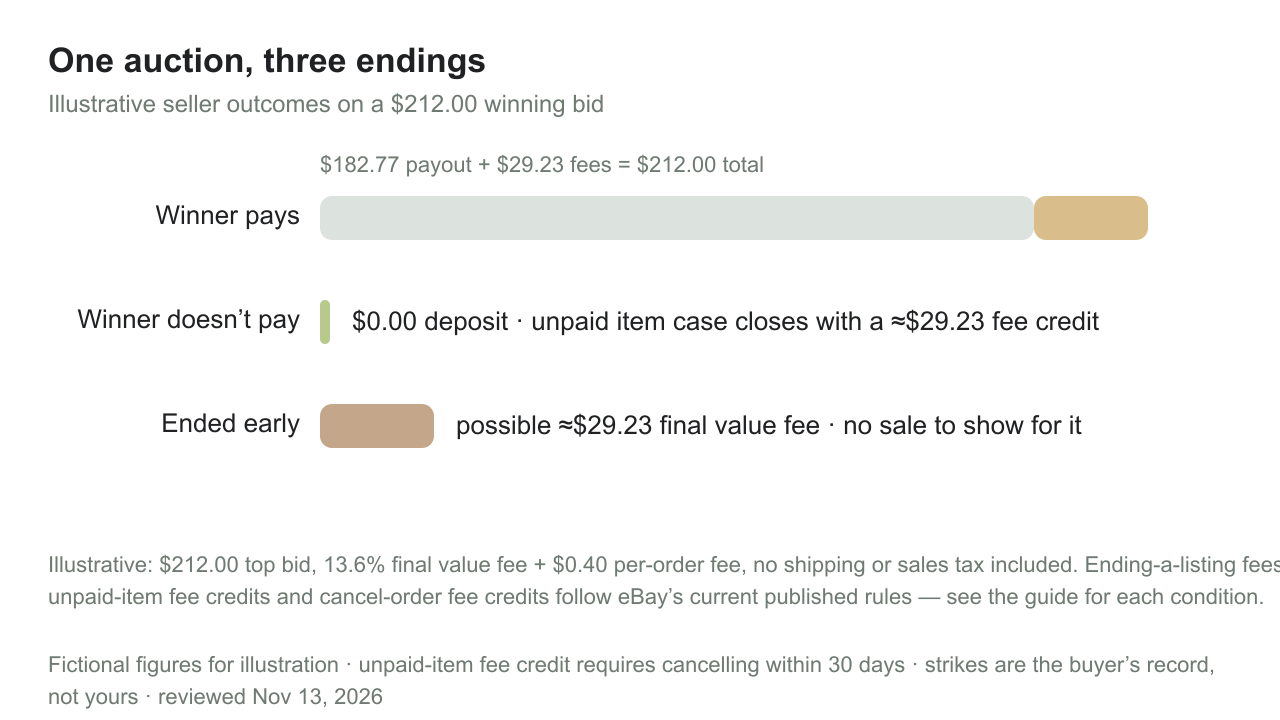
That last combination is the one sellers remember: a fee, computed on a sale price, for a transaction that never happened. If the highest bid was $212, the arithmetic follows the standard schedule — 13.6% plus the per-order fee, about $29.23 — landing on your monthly invoice with no offsetting sale. It is one of the classic “why is there a fee with no deposit” mysteries, and it is worth knowing it exists before you end an auction early in the final hours. Confirm what your listing qualifies for in the ending flow before committing, because the action is not reversible.
What a cancelled bid does to the auction #
Removing the top bid does not freeze the auction at a comfortable price — it hands the lead to the next-highest bidder at their bid amount, which can be substantially lower. Two practical consequences follow.
First, the final price can fall: if a $212 top bid is cancelled and the underbidders topped out at $150, the auction can close near $150 unless new bidders arrive in the remaining time. Cancelling a bid in the final minutes is therefore a real pricing decision, not just a housekeeping one. Second, cancellation changes who wins: the new leader may have a weaker history than the bidder you removed, which matters if your original reason was fraud suspicion — check the replacement bidder’s profile before you commit.
For the books, though, a cancelled bid is a nothing: no sale completed, no fee is charged for the cancellation itself, and the only money already spent is the insertion fee for the listing (non-refundable whether or not anything sells). The financial story of a cancelled bid is one line you already recorded — the listing cost — and nothing new.
Blocking problem bidders before they bid #
Most bid cancellations are preventable one listing earlier. eBay’s buyer management tools let a seller block individual buyers outright and set buyer requirements that screen bidders automatically — criteria such as unpaid-item strikes on the buyer’s record, buyer-reported policy violations, feedback thresholds, and the buyer’s location, with country-level exclusions for sellers who do not ship internationally. eBay’s help covers both the individual block list and the requirements screen, and both apply to active and future listings when configured to.
A blocked buyer who tries to bid sees a message and cannot bid on your listings — which converts a future cancellation conversation into a non-event. Sellers who auction collectibles or high-demand items tend to keep requirements on permanently; the trade-off is screening out new buyers with thin histories, which is a real cost for stores trying to grow a buyer base. eBay also keeps an activity log of blocked buyers with reasons and dates, which is useful when a blocked buyer asks why.
When the winner doesn’t pay: unpaid items #
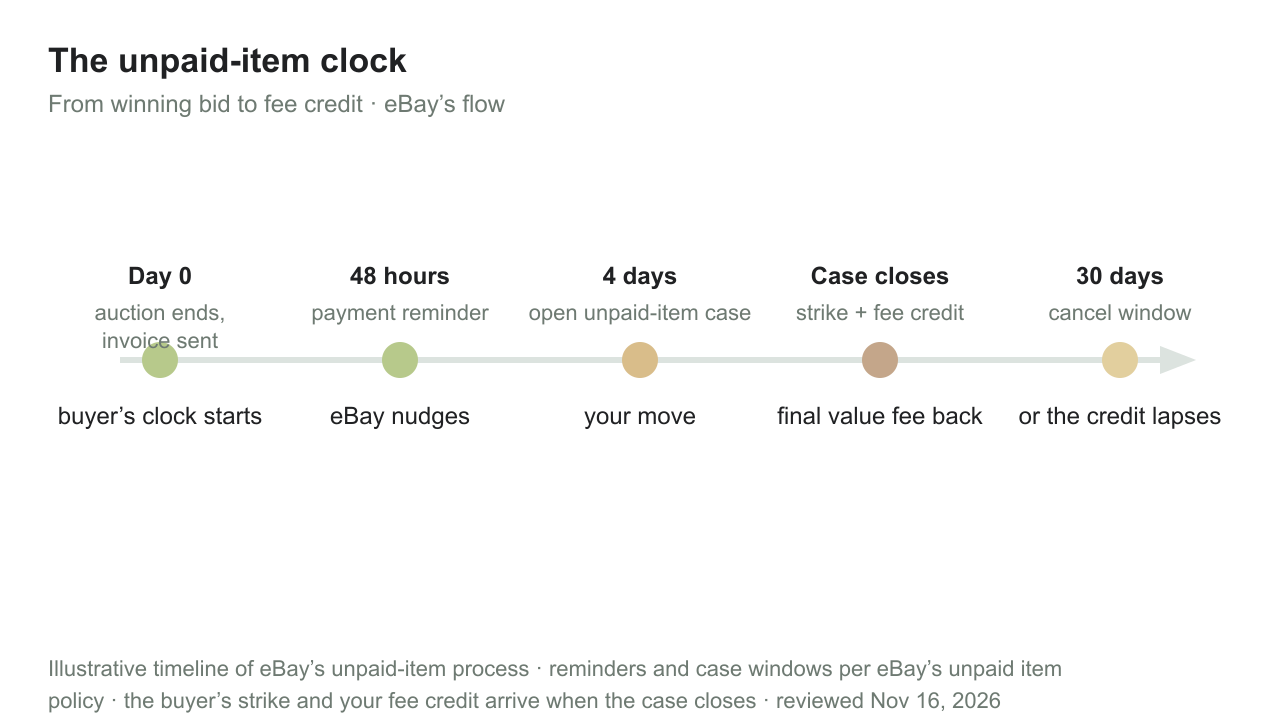
If the auction ends and the winner simply never pays, the bid-cancellation question has already answered itself — there is a sale on the books that produced no money, and eBay has a dedicated flow for it:
- eBay sends the buyer payment reminders 24 and 48 hours after the listing ends.
- The buyer has four calendar days from the end of the transaction to pay under eBay’s unpaid item policy.
- After that window you can open an unpaid item case from the order in Seller Hub. The case gives the buyer a final chance to pay; if it closes without payment, the buyer receives an unpaid item strike and you receive a final value fee credit.
- Cancel the order through the unpaid item flow within 30 days of the sale — eBay’s help calls this out explicitly, because a cancellation recorded too late can forfeit the fee credit.
The fee credit matters enough to plan around: the final value fee on a sold-but-unpaid auction was computed on the winning bid, and without the case-and-credit sequence you would pay selling fees on money you never received. The credit reverses it — but only if the cancellation is recorded properly and in time.
You can also automate the sequence with eBay’s unpaid item assistant, which opens and closes cases on a schedule you set, and once the case closes you are free to resell the item — relist it, or send a second-chance offer to an underbidder if eBay offers that option on the listing. The relist carries its own insertion fee unless your allowance covers it, which is the small recurring cost of the whole episode.
A fictional unpaid-item timeline
An auction ends November 28 at $212. Reminders go out November 29 and 30. December 2, with no payment, the seller opens an unpaid item case; the buyer’s final window passes; the case closes December 5 with a strike for the buyer and a fee credit of about $29.23 for the seller. The seller relists December 6 — a new insertion fee unless the monthly allowance covers it — and the item sells properly in the second auction. The books for November show one sale with no matching money; December shows the fee credit, a listing fee, and the real sale.
Cancelling a transaction after the sale #
Between “bid cancelled before the auction” and “unpaid winner after it” sits the most bookkeeping-relevant path of all: cancelling a completed transaction. Either party can initiate it — buyers for changed-mind and checkout mistakes (in the US, since May 2026, by asking you rather than self-serving it — see the May 2026 change), sellers for out-of-stock, wrong-address or buyer-request situations. When a buyer requests cancellation, the seller has a few business days to respond before eBay can decide the outcome on its own.
The fee consequences are not uniform, and they matter: eBay’s fee-credit policy distinguishes why a sale was cancelled. A cancellation for a reason outside your control returns all fees. A cancellation recorded as out of stock — eBay’s category for a seller-side failure — returns only the category final value fee, keeps the per-order fee, and counts as a transaction defect that can affect your seller level. And a cancellation is also where the fee schedule meets the reconciliation routine: the credit arrives as its own line on a later report, not as a reversal of the original fee.
Fee credits and charges each path leaves behind #
One table, every path:
| Outcome | What eBay charges | What comes back |
|---|---|---|
| Bid cancelled while the auction is live | Nothing for the cancellation itself; the insertion fee is already spent | Nothing to refund — no sale occurred |
| Listing ended with bids, where the ending rules allow it | Possible final value fee on the highest bid, per eBay’s ending rules | — |
| Unpaid item case closes unpaid | — | Final value fee credit, if you cancel within 30 days |
| Seller cancels: reason outside your control | — | All fees credited |
| Seller cancels: out of stock | The per-order fee stays; the case counts as a defect | Category final value fee credited |
| Buyer-requested cancellation you accept | — | Fee credit per eBay’s fee-credit rules (remorse refunds also return the per-order fee) |
Summarized from eBay’s selling fees, fee credits, unpaid item and ending-listing pages, reviewed November 13, 2026. Credits appear as separate lines on later reports; confirm the current rules before choosing a cancellation reason.
The pattern worth internalizing: eBay’s credits follow the reason code, not the fairness of the story. Recording a stock problem as “something happened outside my control” feels kinder to your own defect rate and is the kind of mismatch that surfaces later in a seller-performance review. Pick the reason that is true; let the credit rules do what they do.
The May 2026 change: winning auctions are final for US buyers #
One recent policy shift reshapes the post-auction landscape. Since May 13, 2026, buyers in the US can no longer cancel a won auction themselves — the self-service cancellation option was removed, and a winning bidder who wants out must request a cancellation from the seller, who is free to decline. The change was announced about a month before it took effect and was widely reported; buyer bid retraction while the auction is still running (more than 12 hours out) is unchanged.
For sellers this is mostly good news with one behavioral consequence. The good news: “winning bidder cancelled” stops being a thing — every post-auction exit now runs through you, and the unpaid-item flow covers the buyers who simply go quiet. The consequence: buyers who once self-cancelled now land in your messages asking. Deciding your policy in advance — you will usually grant a prompt, polite request and route the rest through the unpaid item process — turns a stream of judgment calls into a routine, and the fee-credit table above tells you what each decision costs.
What cancellations look like in your books #
Each path leaves different paper:
- Cancelled bid, auction completed by someone else: nothing. No entry for the removed bid, no revenue effect, no fee. The listing’s insertion fee is the only cost and it belongs to the listing, not the bid.
- Ended early with a final value fee: an invoice charge with no sale behind it. Book it as a selling expense in the month it was charged, and expect the “fees with no matching deposit” question at reconciliation — this is one of the known answers.
- Unpaid item: the original sale generated a fee; the closed case generates a credit. Record the credit when its statement line lands, as its own line — not netted into the relist’s economics. The relist’s insertion fee is a new listing cost. If you report on a cash basis, the December credit and the December relist sale land together, even though the failed sale was November activity.
- Cancelled order: the fee credit follows the reason code (table above), and out-of-stock cancels carry the seller-level defect risk — a quiet cost that can surface next month as a performance surcharge on every sale if a level slips.
A fictional month with all three
November: one auction ends with a winner who pays ($182.77 payout), one winner never pays (case closed, $29.23 credit lands on a December report), one listing is ended early after a bid-cancellation request ($29.23 fee on the December invoice, no sale). A books system that records “eBay deposits” and “eBay invoices” as single numbers will show December’s invoice charge and December’s credit as unexplained noise. Recorded as their own lines — fee credit on unpaid item, ending fee, listing fees — each reconciles to a report row, and the month tells its true story: two sales, one non-sale that cost a listing fee, one fee credit.
The habit that keeps this clean is the same one from our refunds and fee-credit reconciliation guide: match every credit and charge to a report row and a reason, and never let a cancellation’s paper trail dissolve into a net number. For the month-end routine that catches all of it, see the month-end close checklist, and for disputes that escalate past cancellation into chargebacks, our chargebacks guide picks up the story.
TidyPayouts splits eBay payouts and invoices into sales, fees, credits and refunds — each one matched to the report row behind it before anything posts.
Avoiding cancellations in the first place #
- Set buyer requirements before you list, not after the first problem bid — unpaid-item strikes and location screens catch most repeat offenders.
- Describe honestly and photograph what you have. The “listing is wrong” cancellation is almost always a description that drifted from the item.
- Don’t edit a live auction listing mid-flight unless something is materially wrong — edits invite confusion, questions and retraction requests.
- Answer bidder messages fast. A buyer who gets a quick, human answer to “is this the 2019 printing?” doesn’t need a cancellation later.
- Know your unpaid-item policy and state it — “payment within 4 days per eBay policy, unpaid item cases opened automatically” in the listing sets expectations before the auction ends.
- Keep stock records synced with listings if an item sells elsewhere too — the out-of-stock cancellation is the one path that costs fees, defects, or both.
An honest caveat: some cancellations are the marketplace working as intended. A fraud-looking bid you cancel in thirty seconds is the tool doing its job — the goal is not zero cancellations, it is cancellations with known costs and clean records.
Common questions #
Can a seller cancel a bid on eBay?+
Yes. A seller can cancel any bidder’s bid at any time before the auction ends, through the listing’s bid history in Seller Hub or My eBay. Cancelling one bid removes all of that bidder’s bids on the listing, the bidder is notified with your explanation, and the action cannot be undone.
Why would a seller cancel a bid?+
The common reasons: the buyer asked to back out, the bid looks fraudulent or comes from a blocked account, the listing turns out to be wrong, or the item is no longer available. Sellers are not obligated to grant a buyer’s cancellation request — it is the seller’s call.
Can a buyer cancel a winning bid?+
In the US, no longer on their own: since May 13, 2026, a won auction can’t be self-cancelled by the buyer — they must request a cancellation from the seller, who may decline. While the auction is still running, buyers can still retract a bid when more than 12 hours remain, or within one hour of placing it inside the final 12 hours.
Does cancelling a bid cost the seller anything?+
Cancelling a bid while the auction is live carries no fee — no sale occurred. The costs nearby are the insertion fee already spent on the listing, the possible final value fee if you end a listing with bids under eBay’s ending rules, and the lower final price if the removed top bid was leading.
What do I do if the auction winner never pays?+
Let the four-calendar-day payment window pass with eBay’s automatic reminders, open an unpaid item case from the order, and let it close. A closed case gives the buyer an unpaid item strike and you a final value fee credit — provided you record the cancellation within 30 days. Then relist or send a second-chance offer to an underbidder.
Does cancelling an order hurt my seller performance?+
It depends on the reason. Out-of-stock cancellations count as transaction defects and can affect your seller level, and they also return fewer fees (the per-order fee stays). Cancellations for reasons genuinely outside your control, and unpaid-item cases, do not carry the same defect weight. Record the reason that is true rather than the one with the best outcome.
How do cancellations and credits show up in my books?+
As separate lines on later eBay reports and payouts — a fee credit for a closed unpaid-item case, a fee credit per the cancel reason, or an invoice charge if a listing ended with a final value fee and no sale. Record each line individually and match it to its report row; netting credits into deposits is how cancellation costs stay invisible for months.
What is the difference between a bid retraction and a bid cancellation?+
A retraction is what a buyer does to their own bid, on eBay’s terms — freely while more than 12 hours remain, otherwise only within one hour of bidding. A cancellation is what a seller does to a buyer’s bid, at any time before the auction ends, removing all of that bidder’s bids on the listing.
Sources and review date #
Reviewed November 13, 2026 against eBay’s published pages below. Interface labels, ending rules and credit conditions change — confirm current behavior in Seller Hub and on eBay’s own pages before acting. Worked examples are fictional; accounting questions deserve your bookkeeper.
Change log. November 13, 2026: Page title and summary shortened for search results; the guidance is unchanged.